To Exam Info
IT 238 -- Takehome Final Exam
Opens: Friday, Nov 12; Closes: Monday, Nov 22, at 11:59pm.
Include a document with this statement in your submission:
I completed the Takehome Final Exam by myself without the help of any other persons.
10 point penalty if this statement is not included.
Do not upload your source code files for this exam to the ectweb server.
Create a folder named THFSmith (replace
Smith with your last name). For each problem create a subfolder that
contains the files needed to solve the problem. Name the subfolders parta,
partb, partc, and
partd. When you are finished, create a zipfile of
THFSmith named THFSmith.zip to
submit. As you did for the class projects, for each part, separate HTML, CSS, and
JavaScript code into files with extensions .html,
.css, and .js, respectively.
Remember, the onclick attribute is not allowed in HTML elements;
instead, add the
event listeners in the JavaScript file with
document.addEventListener or by setting attributes such as
onclick.
Part A: Short Essay Question. 15 points. Only answer one
question out of three. For full credit, write in full
sentences with paragraphs. Target your answers to someone that understands computer programming,
but who is not an expert in web development.
Put your short essay in a word or text document into the parta
folder. About one half to one page.
- Suppose that the body of your HTML page consists of the empty body defined by
<body></body>
Explain how to add content and styles to this body using JavaScript functions.
How is this related to the DOM tree? Give examples.
- What is JSON? How is it used to represent JavaScript content, such as arrays and object literals.
How is JSON data used in a web application. Give examples.
- What are regular expressions? How can they be used used to validate the fields on web pages.
Give examples.
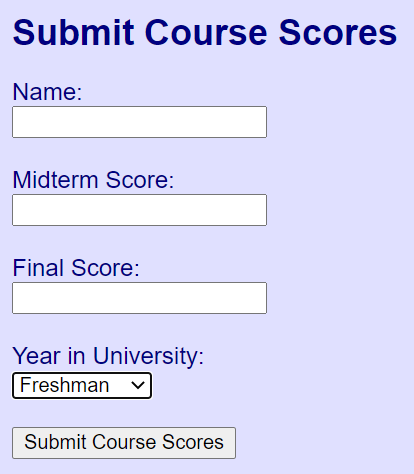
Part B. Submission Form. 15 points.
Part C: Find the Errors. 15 points.
- The Chinese Zodiac is a classification scheme that assigns an animal with
traditional personality traits to each year in a repeating twelve year cycle.
Check out this Wikipedia Article for details and background. The source code files for
Part C define an app that inputs the year of birth, then calculates the Chinese
Zodiac animal, associated with that year. The calculation is performed like this:
var index = year % 12;
Then this index is used to look up the associated animal in this array:
| Index | Animal | | Index | Animal |
| 0 | Monkey | | 6 | Tiger |
| 1 | Rooster | | 7 | Rabbit |
| 2 | Dog | | 8 | Dragon |
| 3 | Pig | | 9 | Snake |
| 4 | Rat | | 10 | Horse |
| 5 | Ox | | 11 | Goat |
In addition to the animal name, associated personality traits and an image of the animal
are displayed. The zipfile
partc.zip contains the
animal images and the JavaScript script traits.js that defines a JSON string containing the
animal names and associated personality traits.
- Here are the source code files that contain errors. Fix the errors, recording the
errors that you find in an error log named errorlog.txt or
errorlog.docx. Include your corrected source code files and your error log in the
partc folder.
------------------------------------------------------------
<!DOCTYPE html>
<!-- Source code file: index.html -->

<html lang="en">
    <head>
        <title>Chinese Horoscope
        <link rel="stylesheet" src="styles.css">
        <script src="traits.js"></script>
        <script src="script.js">
    </head>
    <body>
        <h1>Chinese Horoscope</h1>
        <p>Enter your birth month:
            <select id="#sel1"></select>
        </p>
        <button id="btn1">Show Animal</button><br>
        <p id="p1"></p>
        <img id="img1">
    </body>
</html>

------------------------------------------------------------
/* Source code file: styles.css */
body { color: yellow background-color: red;
       font: bold 100% arial, sans-serif;}
h1 { fontSize: 150%; }
select { width: 100px; height; 30px; }

------------------------------------------------------------
// Source code file: script.js
var imageTag = null;
function showAnimal( ) {
    var selectTag = document.getElementById("sel1");
    var index = selectTag.selectedIndex;
    let year = selectTag.options[index].value;
    var animals = JSON.parse[data];
    var theAnimal = animals[year % 12].animal;
    var theTraits = animals[year % 12].traits;
    var output = "Chinese Horoscope Animal: " + theAnimal +
        "<br>" + "Personality Traits: " + theTraits;
    var pTag = document.getElementById("p1");
    pTag.innerHTML = output;
    var imageName = "images/" +
        theAnimal.toLowerCase( ) + "png";
    imageTag.src = imageName;
}

function init {
    var bodyTag = document.getElementsByTagName("body")[0];
    var selectTag = document.getElementById("sel1");
    for(let year = 1921; year < = 2021; year++) {
        let optionTag = document.createElement("option");
        optionTag.value = year.valueOf( );
        optionTag.innerHtml = year.valueOf( );
        selectTag.appendChild(optionTag);
    }
    imageTag = document.createElement("img");
    imageTag.id = "img1";
    imageTag.style.border = "5px solid yellow";
    imageTag.style.margin = 5px;
    bodyTag.appendChild(imageTag);
    var buttonTag = document.getElementById("btn1");
    buttonTag.addEventListener("click", showAnimal);

window.addEventListener(load, init( ));
Part D: Translate jQuery Code. 10 points.
- The app for Part D allows you to click on monsters to make them disappear and
to restore them by clicking a button. The monster images are in this zipfile:
partd.zip.Translate the jQuery code on the HTML page
to vanilla JavaScript. For the image click event handler, use a click
event e and e.target to
determine which monster was clicked so you can hide it. For the button click
event handler, use a for loop to show all the monsters. For full credit,
use querySelector and querySelectorAll instead of
getElementById and
getElementsByTagName.
Here is the HTML page:
<!DOCTYPE html>
<html lang="en">
    <head>
        <title>Click Away Monsters</title>
        <style>
        body { font-family: Georgia, serif; }
        img { height: 125px; width: 125px; }
        h1, p { color: green; }
        </style>

        <!-- Alternatively, you can also use the
             Google jQuery link. -->
        <script src="jquery-3.6.0.js"></script>
        <script>
        $(function( ) {
            $("img").click(function( ) {
                $(this).hide( );
            });
            $("#btn1").click(function( ) {
                $("img").show( );
            });
        });
        </script>
    </head>

    <body>
        <h1>Click Away Monsters</h1>
        <p>Click on each monster to make it disappear.</p>
        <img src="images/monster1.png">
        <img src="images/monster2.png"><br>
        <img src="images/monster3.png">
        <img src="images/monster4.png"><br><br>
        <button id="btn1">Click to Restore Monsters</button>
    </body>
</html>