Anatomy of a Request
This page reviews the details when a user initiates a request
to the server (e.g. clicking on a link, pressing a button). It is
useful to distinguish between requests that just read from the
database (uses GET) and requests that make changes (write, update,
destroy) to the database (uses POST).
When reviewing the steps for each type of request, it may be helpful to reference the web architecture diagram:
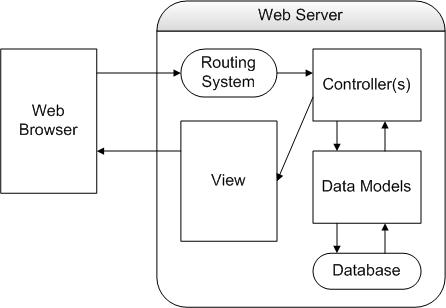
Here's the PDF version and Visio version of the MVC diagram.
Request that reads from the database
Usually these are requests that are initiated when a user
clicks on a link.
Properties:
- GET method is used
- If the request has any parameters, it is part of the URL
(e.g.
/items/23)
- The request is a read operation. That is, database content
is not changed.
Process
- Rails produces the link (e.g.
/items/23)
using thelink_to method. Example: link_to "Item",
item_path(@item)
- The user clicks on a link
- The browser uses the GET method to request the URL of the
link. Example:
/items/23
- The server's routing system parses the URL, identifying any
parameters in the
URL (e.g. ID = 23). The parameters are placed in the
params table.
- The routing system determines the controller (e.g. Items Controller) and calls the method that corresponds to the URL (e.g. show).
- The controller may obtain parameters from the params table.
Example: to get the value of the id parameter:
params[:id])
- The controller obtains values from the data model, performs
additional
calculations and assigns results to instance variables, which
will then be displayed in the view. Example:
@item = Item.find(params[:id])
- Unless the controller methods calls the
redirect_to method, the view matching the name of
the method is automatically instantiated. Example:
show.html.erb
Request by submitting a form
These are requests that are initiated when a user fills out a form and presses the submit button.
Properties:
- POST method is used
- The URL is not visible from the browser
- The request changes content in the database
(e.g. create, update or destroy)
Process
- Rails produces the form using form helper commands. Often
the form is used to assign or modify properties of data objects.
Example: to assign or change values to the
@item
variable, call form_for(@item)
- The user fills out the form and presses the submit button
- If the form is object-centered, the form packages the the
object's properties and values into one parameter using the name
of the object. Parameters are sent using the POST method and
are not part of the URL.
- The server receives the posted parameters and places them in
params table. For example, if the object has
values for item.title and item.year, here is how parameters can
be retrieved:
- params[:item] produces the table for the object's properties and values
- params[:item][:title] retrieves the title for the
object
- params[:item][:year] retrieves the year for the
object
- The routing system determines the controller (e.g. Items Controller) and calls the method that corresponds to the URL (e.g. show).
- The controller may obtain object parameters from the params table. It may use this information to add to or update the model for the database.
- If the database save is successful, the controller methods typically redirects to an information page. If not successful, the controller typically renders (calls the view for) the form again.